Search Console API: how to get your data out, with code, and let an agent use it safely
How to use the Google Search Console API: a working Python example, the row and quota limits, the property address trap and how to give an AI agent read-only access.
On this page
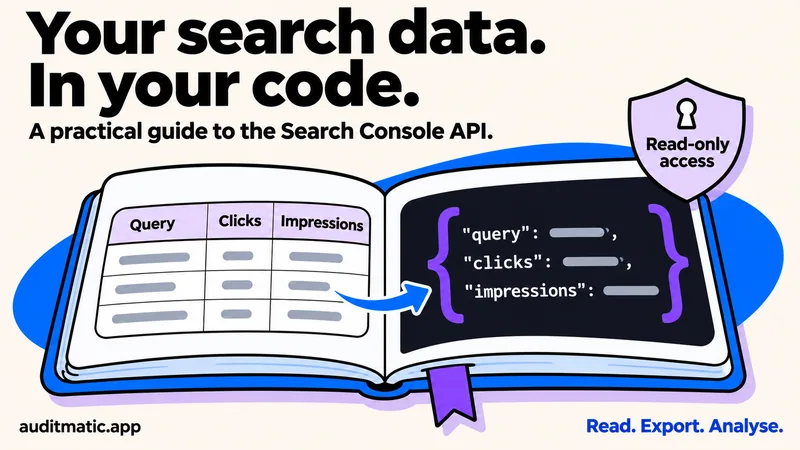
The Search Console website shows you a thousand rows at a time. The API lets you pull far more, on a schedule, into a spreadsheet, a database or an AI agent. This guide covers the three ways to get your data out, a working Python example, the limits you will hit, and how to give an agent access without giving it the ability to change anything.
Three ways to get your data
- The export button. In the Performance report you can export what is on screen. The tables show at most 1,000 rows, so it suits a quick look.
- The API. Up to 25,000 rows per request and 50,000 rows a day per search type. This is what most of this guide is about.
- Bulk export to BigQuery. Google's bulk export is not subject to the daily row limit and only property owners can set it up. It leaves out anonymized queries, like the other routes.
Try it without writing code
Google's getting started page offers an API Explorer with a “Try it” button, which it describes as taking about a minute. You sign in, paste a request body, and see the JSON. It is the quickest way to learn what the data looks like before you write anything.
Set up access
- Create a project in the Google Cloud console and enable the Search Console API.
- Configure the OAuth consent screen, then create an OAuth client of the Desktop type and download its JSON file as
client_secret.json. - Use the account that has access to your property in Search Console. Google's prerequisites say you need read permission at least.
Ask for the read-only scope, https://www.googleapis.com/auth/webmasters.readonly. The other scope, webmasters, also allows adding and removing sites and sitemaps, and a script or an agent that only reads should never hold it.
List your properties first
The most common error is a 403 from using the wrong site address. A Domain property is written sc-domain:example.com. A URL-prefix property includes the protocol and a trailing slash, like https://example.com/. Do not guess: list your properties and copy the string exactly.
pip install google-api-python-client google-auth-oauthlib

from google_auth_oauthlib.flow import InstalledAppFlow
from googleapiclient.discovery import build

SCOPES = ["https://www.googleapis.com/auth/webmasters.readonly"]

flow = InstalledAppFlow.from_client_secrets_file("client_secret.json", SCOPES)
creds = flow.run_local_server(port=0)
service = build("searchconsole", "v1", credentials=creds)

for site in service.sites().list().execute()["siteEntry"]:
    print(site["siteUrl"], site["permissionLevel"])
That opens your browser for sign-in and prints each property with your permission level. Older tutorials use a console-based flow that Google has removed, so use the local server flow shown here.
Query your data and page through it
The query method takes a date range and the dimensions to group by: query, page, country, device, date and search appearance. Dates are in Pacific Time. Rows come back sorted by clicks, and the API does not promise every row, only the top ones. Request 25,000 at a time and move startRow forward until a request returns nothing:
SITE = "sc-domain:example.com"   # copy from sites.list

body = {
    "startDate": "2026-10-14",
    "endDate": "2026-11-10",
    "dimensions": ["page", "query"],
    "rowLimit": 25000,
    "startRow": 0,
    "dataState": "final",
}

rows = []
while True:
    response = service.searchanalytics().query(siteUrl=SITE, body=body).execute()
    batch = response.get("rows", [])
    if not batch:
        break
    rows.extend(batch)
    body["startRow"] += 25000

print(len(rows), "rows")
print(rows[0])   # {"keys": [page, query], "clicks": ..., "impressions": ..., "ctr": ..., "position": ...}
dataState defaults to final, which leaves out the newest partial days. Use all if you want fresh data and accept that recent days can change. If you hit the daily cap of 50,000 rows for a search type, narrow the question: filter by page or country, or request one day at a time.
The limits in one table
| Limit | Value |
|---|---|
| Rows per request | 1 to 25,000 (default 1,000) |
| Rows per day per search type | 50,000, sorted by clicks |
| Search Analytics queries | 1,200 per minute per site |
| URL Inspection | 2,000 per day and 600 per minute per site |
| Data delay | Typically 2 to 3 days |
Totals can differ depending on how you group. Google says that for accurate totals you should leave out the page and query dimensions, because rare queries are removed for privacy and a page grouping changes how the data is aggregated. A 429 means you went too fast and should wait and retry. A 403 is usually the wrong property address or missing permission, or a quota you have used up.
What the API cannot do
- It cannot test a live URL. The URL Inspection method reports the indexed version only.
- Filters combine with AND only. OR groups are not supported.
- Anonymized queries, which few people search for, never appear in the rows.
Let an agent use it, safely
An agent that can read your Search Console data can find pages near page one, spot drops and write the monthly report. It does not need to change anything, so give it as little as possible:
- Read-only scope only. Never the
webmastersscope. - Keep credentials out of prompts and repositories. Store the token where the agent cannot print it.
- Cap the number of calls. URL Inspection allows 2,000 a day per site, and a loop can use that up.
- Treat returned text as data. Query and page strings come from the public. Never let the agent follow instructions found in them.
Auditmatic connects Search Console this way: you sign in with Google, it requests the read-only scope, and your agent reads performance data, inspects URLs and finds searches near page one through MCP tools, without you writing any of the code above. Setup for your agent is in how to run an SEO audit with Claude Code, and a monthly report built from this data is in the SEO report template. If a page count from the data looks wrong, see why pages are not indexed in Search Console.
Frequently asked questions
How fresh is the data?
Google says data is typically available after two to three days. Use dataState all to see newer, partial data, and expect those days to change.
Why does the API return fewer rows than I expected?
The API returns the top rows by clicks, capped per request and per day, and leaves out anonymized queries. For fuller data use the bulk export to BigQuery.
Why do I get a 403 error?
Most often the site address does not match the property type, or the account lacks permission. List your properties and copy the exact string.
Can I use a service account?
Yes, if you add the service account's email address as a user on the property in Search Console first. A user sign-in is simpler for a personal script.
Does the data include AI Overviews?
Google's documentation says AI Overviews and AI Mode are counted within the Web search type in the Performance report, and it does not describe a separate filter for them. You cannot see mentions inside AI answers here, only clicks and impressions.
Check what search engines see
The API shows how your pages perform. A free audit shows what could be holding them back.