AI visibility tracking: why one check tells you almost nothing, and what to do instead
How to track whether AI answers mention and cite your brand: which prompts to pick, how many runs you need, what to record, what it costs and why one check is not enough.
On this page
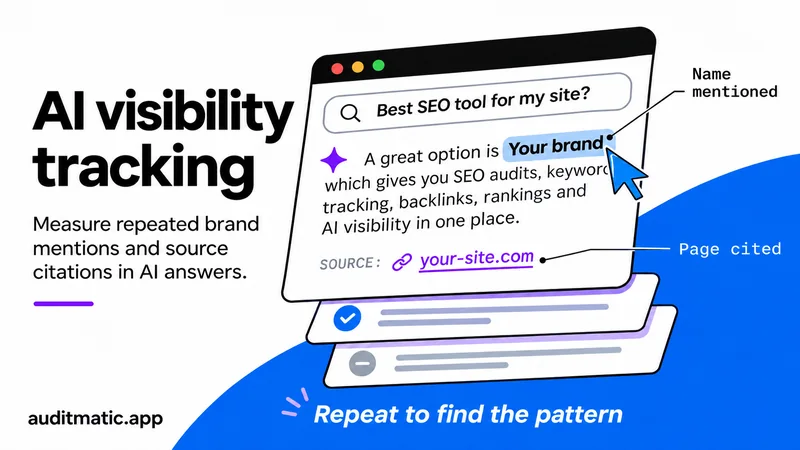
Getting mentioned in AI answers is one problem. Knowing whether it is working is another, and it is harder than it looks, because the same question asked twice can return different brands. This post is about the second problem: how to measure your visibility in ChatGPT, Gemini, Perplexity and Google AI Overviews in a way you can trust. If you want the first problem, see how to get cited by ChatGPT.
Why one check tells you almost nothing
Ask an AI assistant "what is a good SEO tool for a small site" and you will get an answer. Ask it again and you may get a different list. A study by SparkToro and Gumshoe had volunteers run the same prompts 60 to 100 times per platform and found that ChatGPT and Google's AI answers almost never returned the same list of brands in the same order twice. The same brands did appear again and again, so how often you show up was far more stable than where you appear. That is the idea behind everything below: measure the share of answers, not one answer, and ignore position.
Mention, citation and share of answers
These terms are used loosely, and different tools define them differently, so fix your own definitions before you start:
- Mention: your brand name appears in the text of the answer.
- Citation: a link to your site appears among the sources. An answer can mention you without citing you, and cite you without naming you.
- Share of answers: mentions divided by runs. If your brand is named in 6 of 20 runs of a question, your share for it is 30%.
Track mentions and citations separately. They answer different questions: whether people hear your name, and whether your pages are being used as a source.
Choose the questions first
Pick 20 to 30 questions a customer would really ask. Split them in two groups and report them separately:
- Unbranded: "best tool for tracking keyword rankings", "how do I fix a long meta description". These show whether you are discovered.
- Branded: "is Auditmatic good for small sites". These show what is said about you once someone knows your name.
Never blend the two into one score. Branded questions name you in the question, so they will nearly always mention you, and they would hide the real picture on the unbranded ones. Use the customer's own words, from support emails, sales calls and the searches in Search Console.
How many runs do you need?
There is no agreed number. One vendor says 20 to 50 runs per prompt, and the SparkToro study used 60 to 100, with neither giving a reason. You can reason about it yourself. This table is our own arithmetic: the 95% range for a share of 30% at different numbers of runs.
| Runs of one question | Mentioned | Likely true share |
|---|---|---|
| 10 | 3 (30%) | 11% to 60% |
| 50 | 15 (30%) | 19% to 44% |
| 100 | 30 (30%) | 22% to 40% |
At 10 runs, a 30% result could really be anywhere from 11% to 60%, so you cannot tell a good week from a bad one. Pooling answers helps: if you track 25 questions and combine them, the overall range gets much tighter than any single question's. Report a range, and treat a change as real only when the ranges stop overlapping.
What to record
If you track by hand, one row per run in a spreadsheet is enough:
date, engine, question, branded or unbranded, run number,
mentioned (yes/no), cited (yes/no), brands named, sources cited,
logged in (yes/no), web search on (yes/no), location
Keep the full answer text too, so you can read what the model actually said. Settings matter: a logged-in account, a different country or the web-search switch can change the answer, so record them and keep them the same from run to run. Do not track position within the answer. It is the noisiest part.
What it costs, by hand and by tool
By hand, 25 questions on three engines at 20 runs each is 1,500 answers. That is days of copying and pasting, and nobody keeps it up. It is fine for a first baseline of about ten questions, which will show you how different the answers are.
A tool runs the questions on a schedule and stores every answer. With Auditmatic, a scheduled check on ChatGPT, Gemini or Google AI Overviews costs $0.002, so those same 1,500 answers cost about $3. Perplexity costs $0.052 per check and Claude $0.231, because they are real model answers. The app shows the cost before it runs, and it keeps every answer so you can read it. The feature is AI tracking, and the AI explorer helps you find the questions worth tracking.
What Search Console can and cannot tell you
Google's documentation says AI Overviews and AI Mode are counted within your overall search traffic in the Performance report, under the Web search type. A click on a link in an AI Overview counts as a click, and every link in that overview is assigned the same position. The page does not describe a separate filter for them. Search Console cannot tell you whether you were mentioned, only whether someone clicked. For ChatGPT, look in your analytics for referrals with chatgpt.com as the source.
Google also says there are no extra requirements or special markup to appear in AI Overviews: a page must be indexed and eligible to show in Search with a snippet. If a page is not indexed, fix that first, using why pages are not indexed in Search Console.
Reading the results
- Look for prompts where you never appear and see which sites are cited instead. That tells you where to publish or get a mention.
- Compare engines separately. Your share on one can be very different from another.
- Do not read causes into changes. Correlations from vendor studies are not proof that a tactic works. Change one thing, wait, and compare ranges.
- Put it in the monthly report. One line is enough. Our SEO report template shows where.
Frequently asked questions
How often should I track AI visibility?
Weekly is enough for most sites. Daily checks add cost and noise, and you need many runs per question before any change means something.
Is there a free way to do it?
Yes, by hand. Run about ten questions several times each, record every answer and keep the settings fixed. It is slow, but it gives a baseline and shows how much answers vary.
Does ranking on Google mean I will be mentioned by AI?
Not reliably. Pages that rank well can be absent from AI answers, and the reverse. Measure it directly instead of assuming.
Which engine matters most?
It depends on where your customers ask. Start with ChatGPT and Google AI Overviews, add others if your audience uses them, and track each separately.
Start with the basics
A page has to be indexed and crawlable to appear in AI answers at all. A free audit checks that first, and weekly checks over a few months then build the ranges you need.